Why Out-of-Box Business Central Fails (Solutions Inside)
Why Out-of-Box Business Central Fails (Solutions Inside)
Updated: March 26, 2026
10 min
61 views
Written By: Alishba Khan
Fact Checked By: Ahsan Shahid
D365 Specialist
Share
Business Central is a powerful solution designed to meet the needs of businesses. The real strength of the system lies in its ability to extend and meet business needs. Microsoft has made the solution extensible to meet businesses’ needs. A safe extension of the system is significant for its successful implementation. Otherwise, it can create chaos and lead to inefficiencies, waste of time, and resources.
As an Out-of-the-box solution, Business Central can still fail in real-world implementations. Many Retail, ecommerce, and manufacturing businesses report their failures. This is why engaging a reliable Dynamics 365 ERP Consulting Partner is crucial to success.
Understand Out-of-the-box And Why It Fails
The primary purpose of Out-of-the-Box Business Central is to automate standard workflows. This makes it unfit for complex workflows.
It is not designed to handle complex logic, and when businesses force it into place, they encounter several issues that lead to functional gaps. Upgrading the system also becomes a significant problem that overstresses businesses.
The system is not designed to scale due to its limitations. Even the top ERP systems fail if you don’t use safe extensions.
Rather than customizing the standard system, it is safe to use extensions. Modern development practices include using AL extensions, built-in event hooks, and keeping the dependencies separate.
API-based extensions are to be used to handle complex integrations.
Extensions are designed to fulfill the complex needs of the business. Extensions are an alternative to customization, offering safe upgrades as the codebase lies outside the base code.
With model development and AL development, there is no room for conflicts arising during upgrades.
Traditional customization leads to
Complicated Upgrades
Deterioration
Malfunction
Rigorous controls
Business Central extension came to the rescue with:
No base code modification
Extension didn’t break after updates
Easily uninstall extensions
Clear maintenance
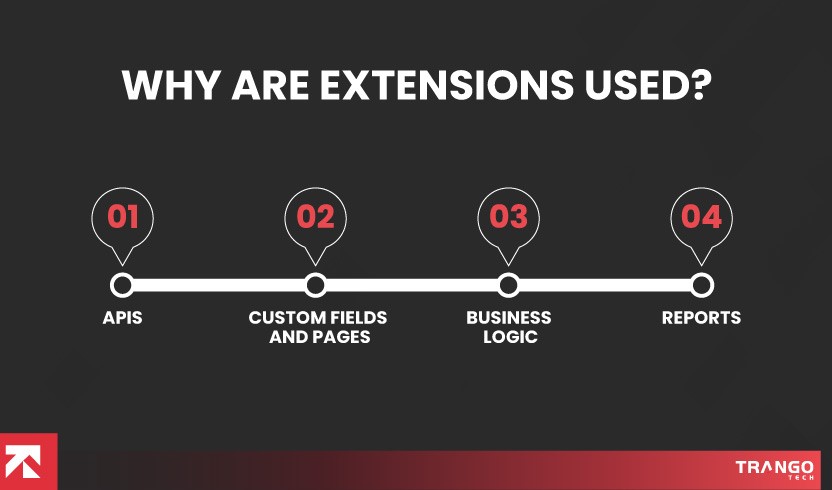
Why Are Extensions Used?
Extensions are used for several reasons, including
To add new APIs, pages, and reports
For new fields to tables
Page layout and field modification
Custom business logic application
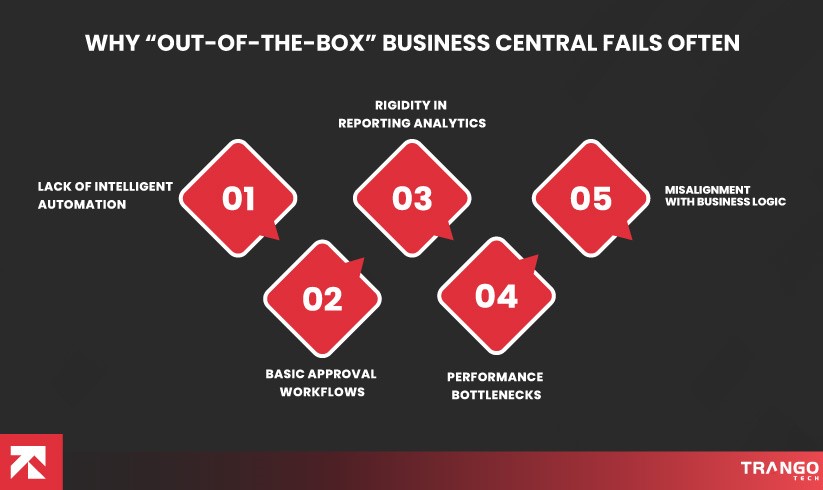
Why “Out-of-the-Box” Business Central Fails Often
Now the real question comes to why “Out-of-the-Box” Business Central Fails. It is because the software is not designed for the relevant industry and has gaps in its configuration.
Lack Of Intelligent Automation
The absence of intelligent invoice capture OCR results in manual data entry, leading to errors. You must also define your ERP requirements to select the suitable system.
Basic Approval Workflows
The OOTB Business Central workflows work well for simple scenarios, but do not fit real-world use cases. The multiple approval stages make the workflows rigid, and there is no real-time visibility.
Rigidity In Reporting Analytics
The basic reports do not meet the criteria for a specific industry.
Performance Bottlenecks
Processing large datasets together can slow down the system. Also, standard reports do not provide a holistic view of the data. Power BI integration can process massive data without disrupting performance.
Misalignment With Business Logic
Using a standard system when you actually need an industry-specific solution. Using a system that lacks features relevant to the business industry will not fulfill the purpose of implementing it.
Does a failed D365 Business Central implementation impact you?
Connect to our experts and transform your operations today.
Implementation And Data Pitfalls
The failure is the result of common implementation and data pitfalls that disrupt the system. These include unclean data migration, excessive customization and system failures. Some of the major issues include:
Unclean Data Migration
The problem occurs when uncleaned data is migrated to Business Central. Historical data that consists of errors is migrated to the new system. Expert D365 migration services must be procured to ensure a clean migration.
The Partner Gap
Hiring an unreliable, inexperienced partner leads to failure. A partner who has never worked on your niche will not be able to deliver what your business requires.
Designing Upgrade Safe Extensions
The failure of Out of the Box Business Central is due to a poor extension design. All the customization happened just to witness failure at the end.
This is where a clean core strategy is required for upgrading safe extensions. It is a strategy that does not touch the core code.
Now the question is how the extensions are created.
It simply creates custom functionality using the released API, so that during updates, custom logic is not affected.Adopt the clean core extensibility model and explore our complete Business Central API Guide.
Decouple From Standard Code
Again, the core code should not be disturbed.
Do not override standard logic and do not access private methods.
Use Released APIs Only
Released updates provide stability during upgrades.
So if you are using an unleashed object, it may disrupt your system.
A clean core design requires you to use only vendor-released updates and supported extension points.
Develop side-by-side extensions
You must develop side-by-side extensions using a trusted platform. This saves your core system from the excessive burden and upgrade risks.
Follow a cloud native development model.
Use the cloud model to comply with the ABAP cloud model.
Syntax enforcement
Use only approved APIs and object types to ensure safe development and minimize upgrade risks.
Use modern cloud-ready technologies, RESTFUL architectures, API based integrations to ensure compatibility with cloud upgrades.
Understand clean core risk levels
Extensions are categorized into different levels for clear assessment.
Level A
Utilizing released updates
Level B
Unreleased APi
Level C
Non-released APIs
Level D
Unsupported APIs
Avoid Excessive Use Of Extensions
You must avoid using custom extensions unnecessarily. Analyze whether the standard extension can get the job done; if not, use custom extensions.
Document And Justify
Now that you have decided to use an extension, maintain the reason to use it in a document.
Automated Testing
Testing should be automated to enable immediate issue identification.
Utilize the Application Extension Technology
Now is the time to apply the correct approach to the extension.
Why clean code extensions will survive
There are no technical issues, upgrade fails, update disruptions, or lower cost of ownership.
Clean core extensions offer smart customization while ensuring the system remains stable and intact, and free of any disruptions.
These extensions will surely not break during upgrades and provide a sustainable path forward.
You must properly connect the systems if you are using other tools and applications. You must engage an experienced partner with expertise in Dynamics 365 Amazon integration.
Has your Out-of-the-Box” Business Central ” failed?
Trango Tech is here to rescue you with its expert services.
Real World Example
For a Manufacturing business
A manufacturing business was facing issues with batch management and process manufacturing. The failure was even fatal when they tried to customize the base code.
So, Trango Tech created a modular extension that automated operations and maintained data integrity.
Role-based dashboards, live data tracking, and integrated batch and lot tracking improved production efficiency.
The production efficiency improved to an unbelievable 40%.
For a Retail business
So, another client in the retail industry was facing hurdles in managing the store during seasonal fluctuations. OOTB was not efficient enough to help them handle inventory across store locations.
Trango Tech used an API-based extension to automate order generation based on seasonal demand and historical trends. The system generates alerts for stockouts as rule-based replenishment logic is applied.
And the system achieved outstanding results, with an 85% improvement in inventory accuracy.
Lessons Learned From The Projects That Achieved Efficiency
Trango Tech has implemented Business Central for several businesses and helped them achieve efficiency and productivity. The key finding after developing a system that didn’t break during the upgrade is avoiding unnecessary customization.
Extension Saves The Business
Modifying core code is not the solution. It is a long-term technical debt that may not be visible initially but will produce problems as Microsoft releases updates. Changing the standard code causes breakage when updates are released.
Therefore, extensions are a safe option because they are used in isolation. And this separation prevents the breakage of custom functionality.
Data Quality Is A Must
If poor data is loaded into a system, even a well-designed system can fail. Extensions will not work properly due to mismatches in data, incorrect reports, or poorly defined dimensions. During our projects, we identified data quality as a significant issue in the system. Moreover, applying cleanup processes and data governance rules is a must before developing extensions.
Process Alignment
Extensions are designed to create a new system that works for the business, not replicating the old process. Extensions must be built to improve the business’s operations. The whole purpose of the extension is to improve the workflow.
Configuration before Customization
Using the configuration options provided by Business Central will solve the problem instead of hard-coding logic. Provide users with flexibility by allowing them to set apartments, tables, and rules that they can adjust easily. Developer assistance should not be required for it. It provides ease of use and better adaptability.
Avail Dynamics 365 Shopify integration services to connect your ecommerce store seamlessly. Properly connecting systems will also play a huge role in the success of your implementation.
Testing Everything
Issues arise if the extensions are not tested. Rigorous testing is required to detect errors early. Real scenarios must be tested, such as permission validation and edge cases for stable extensions. This will keep the system stable as soon as Microsoft releases updates.
Also Read:How We Rescued a Failed Business Central Implementation: A Playbook You Won’t Find in Microsoft Docs
Conclusion
Vanilla Business Central fails SMBs because it lacks intelligent business automation, misaligns with business logic, and has implementation and data pitfalls. But designing an extension using released APIs, decoupling standard code, developing side-by-side extensions, following a cloud native development model, automated testing, and utilizing the Application Extension Technology delivers exceptional results. This leads to the creation of a future-proof solution that aligns with business processes.
FAQs
Q1. What is out of the box Business Central?
Out of the box, Business Central is used to automate business processes using standard workflow. It is not suitable for fulfilling the complex needs of enterprises.
Q2. Why does out-of-the-box Business Central fail?
There are several reasons for failure, including data issues, lack of automation, over-customization, misalignment with business logic, and unclean data.
Q3. What is the effect of OOTB failure on a business?
The OOTB Business Central failure may affect a business by creating a functional gap and lower user adoption.
Q4. Why are extensions needed?
Extensions are needed to address complex business requirements that the OOTB Business Central solution cannot handle.
Q5. How are upgrade-safe extensions created?
Upgrade-safe extensions are created using modular and AL extensions, event hook points, and API-based and Power Platform integrations.
Q6. Which industries require extensions?
Extensions are used for manufacturing, retail, professional services, and distribution industries.
Q7. What is the strategy to keep extensions upgrade-ready?
To keep the extensions upgrade ready
Use the Al extension
Do rigorous testing
Ensure data quality
Ensure process alignment
Q8. Can you customize Business Central without breaking upgrades?
Absolutely. You can use AL and API based integrations to customize Business Central without breaking upgrades.
Q9. What are the D365 BC customization best practices to design extensions that don’t break?
The D365 BC customization best practices include maintaining data quality, performing configuration before customization, and rigorously testing real scenarios to ensure the extension does not break.
Trango Tech, a certified Microsoft Solutions Partner, transforms businesses by offering tailored ERP solutions that deliver a high return on investment (ROI).
Begin your Business Central implementation journey.
About author
Alishba Agha is a Senior ERP Content Writer specializing in Dynamics 365 and Business Central, creating actionable guides on ERP migrations, ecommerce integrations like Magento multi-warehouse sync, and manufacturing workflows for SMBs. With extensive experience, she covers GP-to-Business Central transitions, inventory dimension mapping, and Power BI analytics, transforming complex ERP concepts into clear, SEO-optimized blogs for Trango Tech readers.
Rate this Article
2 ratings, average : 3 out of 5
Leave A Reply
Your Email Address Will not be published. Required Fields Are Marked
Related Blogs
All
Business Central vs Custom ERP for SMEs in the USA: Where Textbook Advice Falls Apart
Businesses exploring ERP solutions are initially skeptical about choosing a solution and believe they need to customize it…